

Wireless File Transfer Between Android and PC
Overview
Web PC Suite is a desktop application designed to simplify file transfers between Android smartphones and personal computers. By installing the app on both devices, users can move files wirelessly over the internet, eliminating the need for physical cables. The software targets individuals who prefer a cable-free workflow, particularly those who find USB connections inconvenient or cumbersome. It is especially useful for users who frequently share photos, documents, or media files between their mobile and desktop environments.
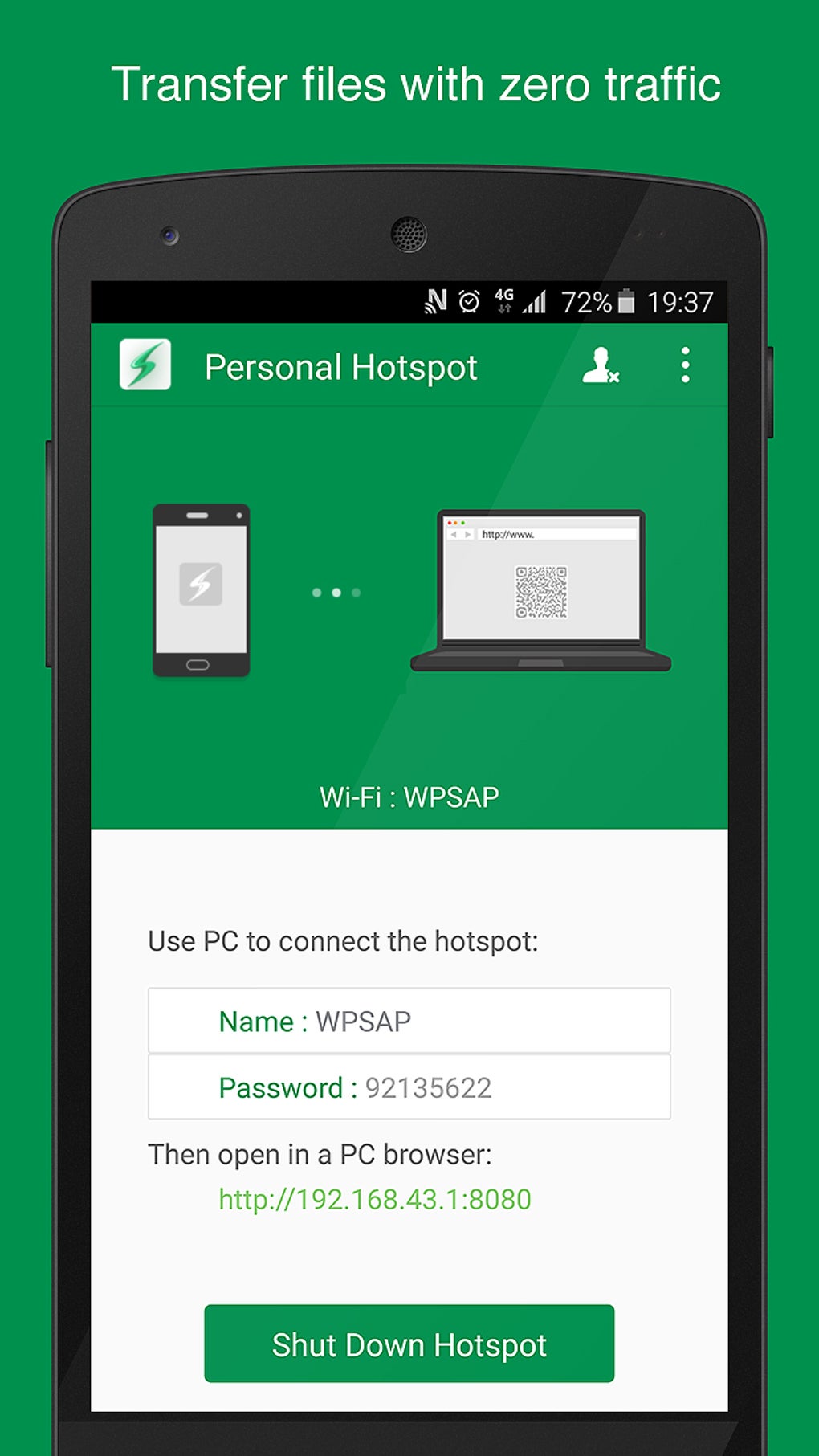
The app operates through a web-based interface, allowing users to initiate transfers by accessing a shared URL. Once connected, files can be sent from the smartphone to the PC using a simple drag-and-drop method. While the solution offers convenience for casual users, it is important to note that the connection and login process are not encrypted, making it unsuitable for transferring sensitive or confidential data. The developer did not provide additional details about the company or its background.
Real-world scenarios include quick photo transfers after a trip, sharing large video files without waiting for cloud sync, or moving documents between devices during remote work. The app supports both Windows and Mac operating systems, making it accessible to a broad user base. However, performance and stability may vary depending on network conditions and device capabilities.
Key Features & Capabilities
- Wireless File Transfer – Enables direct file movement between Android devices and PCs over the internet without requiring USB cables.
- Drag-and-Drop Interface – Simplifies the transfer process by allowing users to move files with intuitive gestures, improving usability for non-technical users.
- Web-Based Connection – Uses a browser-accessible URL to establish communication between devices, reducing setup complexity.
- Device Contact Book – Stores previously connected devices for faster reconnection, streamlining repeated transfers.
- Cross-Platform Support – Compatible with both Windows and Mac systems, ensuring broad accessibility.
These features are ideal for users who want to avoid the physical constraints of USB cables. For example, a photographer can transfer images directly from their phone to their desktop while working remotely, or a student can move lecture notes from their tablet to their laptop without interrupting their workflow. The app’s reliance on a web interface also means no complex configuration is required, making it suitable for quick, one-time transfers.
User Interface, Workflow & Performance
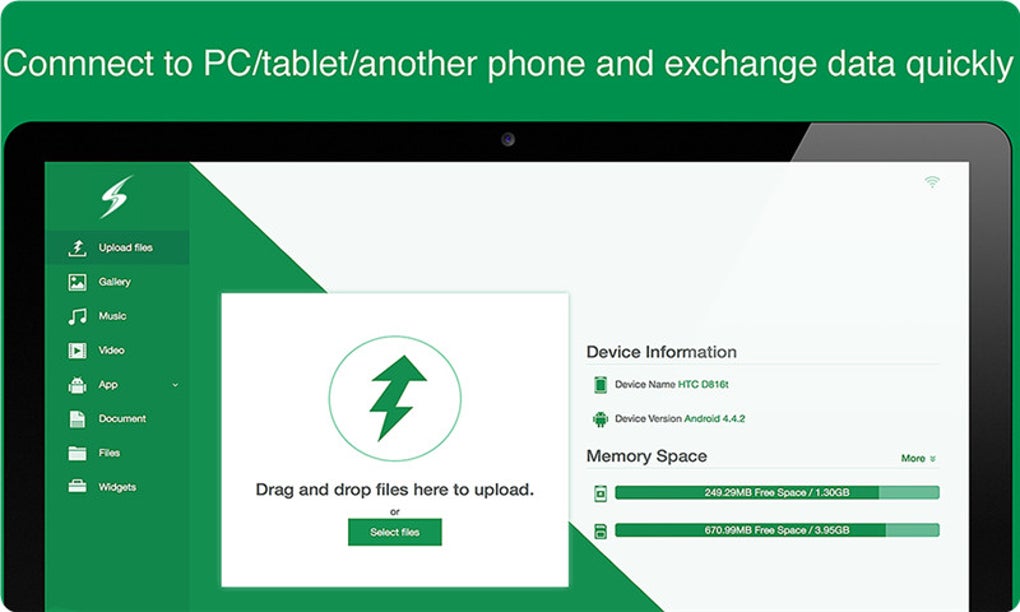
The user interface of Web PC Suite is designed around simplicity and ease of use. The desktop application presents a clean layout with a central area for incoming files and a sidebar for managing connected devices. Navigation is straightforward, with minimal menus and clear visual cues. The workflow begins with launching the app on both the PC and the Android device, then accessing the provided web link to initiate the connection.
Once connected, users can browse files on their phone and drag them directly into the PC’s designated folder. The process is intuitive and requires no technical knowledge. However, the developer did not specify resource usage details, so performance may vary based on system configuration and internet speed. Stability during prolonged transfers is not confirmed, and no information was provided about CPU or RAM behavior under load.
Performance observations are based on general software behavior patterns. Users with slower internet connections may experience delays, while those on stable networks should see smoother results. The lack of encryption in the connection process is a notable limitation, especially for users concerned about data privacy.
Compatibility & System Requirements
Web PC Suite is compatible with both Windows and Mac operating systems, supporting a wide range of desktop environments. The software has a file size of 15.2 MB, indicating a lightweight installation that should not significantly impact system storage. The version number is 2.1, released on March 15, 2024.
Exact system requirements were not listed, so users should ensure their devices meet basic desktop software standards. The developer did not specify minimum CPU, RAM, or disk space needs. Platform compatibility information is limited to the operating systems mentioned, and no details were provided about mobile OS compatibility beyond Android.
Installation is reportedly quick, and the app can be launched immediately after setup. For users on older systems, compatibility may depend on available system libraries and browser support. No additional dependencies were mentioned.
Pros and Cons
Pros
- Eliminates the need for USB cables for file transfers
- Simple drag-and-drop interface improves usability
- Quick setup and fast initial connection
- Supports both Windows and Mac platforms
- Device contact book speeds up repeated connections
Cons
- No encryption for data transfer or login
- Performance depends heavily on internet speed
- No information on system requirements or resource usage
- Not suitable for transferring sensitive or confidential files
- May be slower than direct USB transfers for large files
FAQ Section
Is Web PC Suite compatible with all Android devices?
The software is designed for Android smartphones and tablets, but the developer did not specify which versions or models are supported.
Can I use Web PC Suite without an internet connection?
No. The app requires an active internet connection on both the PC and the Android device to establish communication.
Is the file transfer process secure?
There is no indication of encryption during the transfer or login process. Sensitive files should not be transferred using this app.
How often does the software receive updates?
The last version was released on March 15, 2024. No information was provided about the update frequency or release schedule.
Can I use Web PC Suite offline after connecting once?
Once connected, the app requires an internet connection to transfer files. Offline usage is not supported.
Final Thoughts + CTA
Web PC Suite offers a convenient, cable-free solution for transferring files between Android devices and desktop computers. Its intuitive drag-and-drop interface and cross-platform support make it a solid choice for users who prioritize ease of use over advanced security. While the lack of encryption and unclear system requirements are notable drawbacks, the app remains a practical tool for casual, non-sensitive file sharing.
It is best suited for individuals who dislike USB transfers and want a quick, wireless alternative. For those who frequently move photos, documents, or media files between devices, the app delivers on its core promise. However, users handling confidential data should consider more secure alternatives.
Download Web PC Suite now





.png)

